Keeping confidential client data safe in document editing
Confidential client data safe document editing is defined as the practice of applying encryption, metadata removal, and controlled access to documents throughout the editing lifecycle to prevent unauthorised disclosure and maintain regulatory compliance. In regulated industries, the standard industry term for this discipline is secure document editing, and it sits at the intersection of information governance and professional practice. Tools such as CryptPad, Adobe Acrobat, and Microsoft Azure Document Intelligence each address different layers of the problem. Without deliberate safeguards, even a routine editing task can expose client names, revision histories, and organisational data to unintended recipients.
What are the risks of editing confidential client documents without proper safeguards?
The most underestimated risk in document editing is not a breach from outside. It is accidental disclosure from within the document itself. Metadata embedded in Word and PDF files can expose author details, revision history, and organisation data to anyone who receives the file. A solicitor sending a contract draft to a counterparty may inadvertently include tracked changes showing internal negotiation strategy.
Cloud collaboration tools compound this risk. Platforms without end-to-end encryption store document contents on servers that administrators, and potentially third parties, can access. GDPR Article 32 requires organisations to implement technical measures appropriate to the risk, and a shared cloud editor with no encryption agreement almost certainly fails that test. HIPAA carries equivalent obligations for health data, with specific technical safeguard requirements that generic productivity tools rarely satisfy.

Version control failures create a separate exposure. When multiple editors work across emailed copies, the wrong version of a document containing redacted information can be sent in place of the final, clean copy. This is not a theoretical risk. Law firms and financial advisers have faced regulatory action precisely because version management was informal.
Common accidental disclosures in document editing include:
- Sending a Word file with tracked changes visible to external parties
- Sharing a PDF without removing form field data or embedded scripts
- Using a free online conversion tool that retains uploaded files on its servers
- Forwarding a document from a personal email account outside the firm’s data processing agreement
Pro Tip: Treat metadata scrubbing as a mandatory step at every save point, not just before final delivery. Metadata and collaboration artefacts such as comments and track changes persist invisibly and require explicit removal to prevent leakage even from encrypted documents.
Which tools enable secure editing of confidential client documents?
The right tool depends on the document type, the regulatory framework, and whether editing happens locally or in the cloud. No single platform covers every scenario, which is why professionals in regulated industries typically combine two or three solutions.
CryptPad’s zero-knowledge design encrypts all text on the user’s device before transmission, meaning encryption keys never leave user control. Even CryptPad administrators cannot read file contents. This architecture is particularly suited to legal and financial professionals who need collaborative editing without trusting a cloud provider with plaintext data. The trade-off is a less feature-rich editing environment compared to Microsoft Word or Google Docs.
Adobe Acrobat addresses a different layer. Password-protected PDFs with editing permissions restrict copying, printing, and modification, and Acrobat’s redaction tools permanently remove sensitive text rather than simply covering it visually. For finalised documents that must be shared externally, Acrobat remains the most widely deployed enterprise PDF tool.
Microsoft Azure Document Intelligence processes documents in region-specific encrypted storage with authenticated API access and deletion capabilities. For organisations running cloud-based document analysis workflows, this provides a compliant foundation, provided that data residency settings are configured to match the jurisdiction of the client data.
| Tool | Encryption type | Access control | Metadata handling |
|---|---|---|---|
| CryptPad | Client-side, zero-knowledge | User-controlled keys | Limited built-in scrubbing |
| Adobe Acrobat | AES-256 at rest | Password and permissions | Redaction and metadata removal |
| Microsoft Azure Document Intelligence | AES-256, region-specific | API key and role-based | Temporary retention with deletion |
| Microsoft Word (local) | File-level encryption | Password protection | Manual scrubbing required |
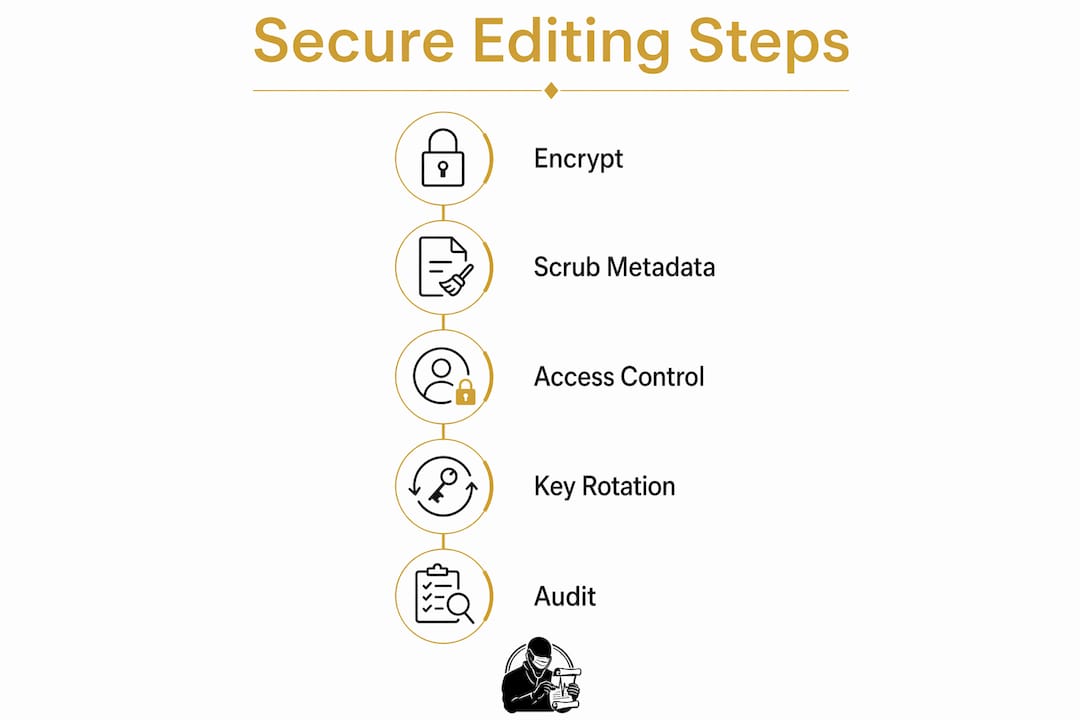
Key management systems (KMS) sit beneath all of these tools. Failure to rotate encryption keys or maintain key management policies is a frequent audit finding and risks unauthorised data access even when the underlying encryption is technically sound. Any organisation handling health or financial data should document its key rotation schedule and assign ownership to a named individual.
Pro Tip: Before committing to a cloud document service, request the vendor’s encryption and key custody documentation. Verify that the service agreement includes a data processing agreement (DPA) or, for health data, a Business Associate Agreement (BAA).
How to establish a secure editing workflow for confidential client documents
A secure editing workflow is not a single tool choice. It is a sequence of controls applied consistently from the moment a document is received to the moment it is archived or destroyed. The following steps reflect current best practice for regulated industry professionals.
- Classify the document on receipt. Apply a sensitivity label (Confidential, Restricted, or equivalent) before opening. NIST guidance identifies data classification as foundational to protecting confidential information. Without labelling, controls fail because editors do not know which safeguards apply.
- Open in a controlled environment. Where possible, edit locally on an encrypted device rather than uploading to a cloud editor. If cloud editing is necessary, use a platform with a signed DPA and, for health data, a BAA.
- Scrub metadata before and during editing. Remove existing metadata when the document is first opened. Repeat the scrub after each significant editing session, not only at the end.
- Apply role-based access. Restrict editing rights to named individuals. Reviewers who need to read but not alter the document should receive read-only access. Version control should be centralised so that only one authoritative copy exists at any time.
- Log all access and changes. Effective compliance requires not just encryption but also audit logging and governance around document handling. Logs should record who accessed the document, when, and what changes were made.
- Finalise and distribute securely. Convert to PDF with editing restrictions applied. Remove all metadata from the final file. Transmit via encrypted email or a secure file transfer service, not as an unprotected email attachment.
- Archive or destroy according to policy. Retention schedules must align with the jurisdiction’s requirements. Cloud tools that retain temporary copies must be configured to delete those copies within the permitted window.
Legal documents edited remotely should be subject to NDAs and explicit contractual confidentiality obligations binding both editors and any subcontractors, limiting data exposure outside the organisation.
Pro Tip: Integrate NDA execution and policy acknowledgement into your document onboarding process. A signed confidentiality agreement with every external editor or vendor is not a formality. It is an enforceable control that defines liability if data is mishandled.
What common mistakes cause security lapses in confidential document editing?
Most security failures in document editing are not the result of sophisticated attacks. They are the result of routine oversights that accumulate over time. Recognising these patterns is the first step to eliminating them.
The most frequent errors include:
- Overlooking metadata in intermediate versions. Teams scrub the final document but forget that emailed drafts, shared review copies, and version backups carry the same metadata risks.
- Weak or shared passwords on encrypted PDFs. A single password shared across a team cannot be revoked when a member leaves, and short passwords are vulnerable to brute-force attempts.
- Failing to rotate encryption keys. Adding application-level encryption on top of disk encryption protects sensitive fields even if server-side controls are compromised, but only if keys are rotated and managed actively.
- Using unauthorised cloud tools. An editor uploading a client document to a free online grammar checker or format converter creates a data processing relationship with no legal basis. Non-production environments often weaken editing controls, and maintaining equivalent safeguards across all environments prevents accidental leaks.
- Neglecting audit log review. Logs are only useful if someone reads them. Periodic access recertification, where managers confirm that current users still require their level of access, is a standard control in ISO 27001 and HIPAA compliance programmes.
A quick pre-distribution checklist reduces the risk of these errors significantly:
- Has metadata been removed from this version?
- Is the recipient authorised under the relevant data processing agreement?
- Has the document been converted to a restricted PDF for external sharing?
- Is the transmission method encrypted?
Pro Tip: Schedule a quarterly technical audit of your document editing tools and a brief team training session covering the most recent incidents or near-misses. Awareness of Swiss business confidentiality practices and similar international frameworks can sharpen your team’s understanding of what regulators actually scrutinise.
Key takeaways
Secure document editing in regulated industries requires encryption, metadata scrubbing, and access governance applied consistently across every stage of the editing lifecycle, not only at the point of final delivery.
| Point | Details |
|---|---|
| Metadata is a persistent risk | Scrub author details, revision history, and comments at every save point, not just before sending. |
| Tool selection determines compliance | Match tools to regulatory requirements: CryptPad for zero-knowledge collaboration, Adobe Acrobat for PDF access control. |
| Key management is non-negotiable | Document and rotate encryption keys on a defined schedule; failure to do so is a common audit finding. |
| Workflow design prevents human error | A numbered, role-based workflow with audit logging reduces accidental disclosure more reliably than any single tool. |
| Contracts enforce confidentiality | NDAs and data processing agreements with all editors and vendors create enforceable obligations, not just good intentions. |
Why metadata is still the biggest blind spot I see in regulated practices
After years of working with professionals in legal, healthcare, and financial services, the pattern I observe most consistently is this: teams invest in encryption and access controls, then send a Word document by email with three months of tracked changes intact. The technical controls are sound. The operational habit is not.
Zero-knowledge tools like CryptPad represent a genuine shift in how confidentiality is preserved. When even the service administrator cannot read your files, you have removed an entire category of risk. But most regulated professionals are not yet using them for day-to-day editing, partly because the user experience does not match Microsoft Word, and partly because procurement and IT approval cycles are slow. The gap between what is technically available and what is operationally deployed remains wide.
The vendors I trust most are those who can produce their DPA, their key rotation policy, and their audit log format within 24 hours of being asked. Vendors who cannot are telling you something important about their internal governance. Contractual safeguards, as outlined in professional editing confidentiality policies, are not a substitute for technical controls, but they are the mechanism by which accountability is assigned when controls fail.
The practical advice I give to every team I work with is simple: treat every document as if it will be disclosed in litigation. That mindset changes how people handle drafts, how they use cloud tools, and how seriously they take the metadata scrub. It is not paranoia. It is professional discipline.
How Docpolish protects your clients’ confidential documents
Regulated industry professionals face a specific problem when using AI tools to polish documents: the AI engine needs to see the text, but the text contains client data that must never leave a controlled environment.
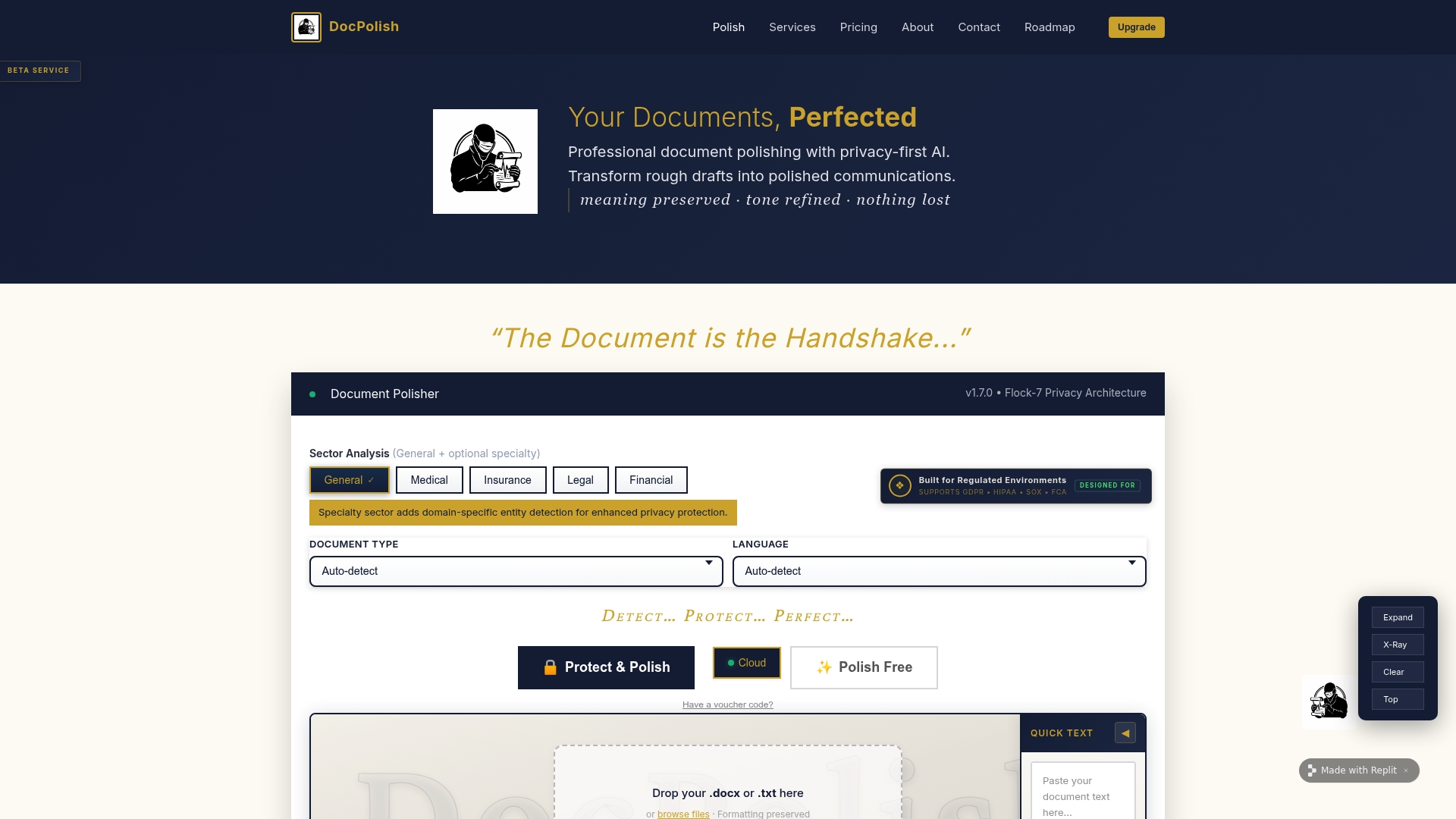
Docpolish resolves this by detecting and anonymising personally identifiable information (PII) in the browser before any content is transmitted. The AI engine receives anonymised text, performs the editing, and the original PII is restored in the final output. Every processed document receives a trust identifier, creating an audit trail that supports GDPR and HIPAA compliance. For professionals who need secure document editing without compromising on quality or compliance, Docpolish is built precisely for that requirement.
FAQ
What is secure document editing in regulated industries?
Secure document editing is the practice of applying encryption, access controls, and metadata removal to documents containing confidential client data throughout the editing process. It is required under frameworks including GDPR, HIPAA, and ISO 27001 for organisations handling sensitive personal or financial information.
How does metadata leakage occur in document editing?
Metadata leakage occurs when Word or PDF files are shared without removing embedded data such as author names, revision history, and tracked changes. Removing metadata before sharing is the primary control against this type of accidental disclosure.
What encryption standard applies to confidential health documents?
HIPAA requires AES-256 encryption at rest and TLS 1.2 or higher in transit for health data. These standards apply to documents during editing, storage, and transmission, not only to databases or backups.
Can free online editing tools be used for confidential client documents?
Free online tools that upload documents to external servers cannot be used for confidential client data without a signed data processing agreement. Using such tools without a legal basis creates a compliance violation under GDPR and, for health data, under HIPAA. The legal requirements for data protection carry significant financial and reputational consequences for businesses that ignore them.
How often should encryption keys be rotated for document security?
Encryption keys should be rotated on a defined schedule, typically annually at minimum, with immediate rotation following any suspected compromise or staff departure. Failure to rotate keys is a frequent finding in HIPAA and ISO 27001 audits and represents a material risk to client data protection.